WinHex 範本(模板)分享!

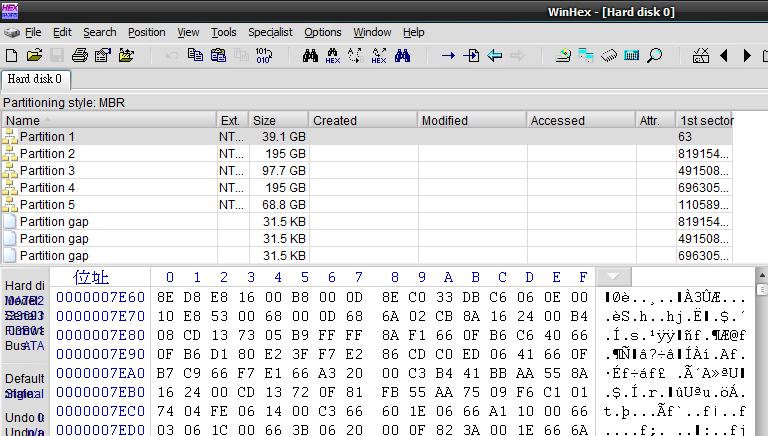
WinHex 16進位軟體透過範本可以深層的解析檔案結構,進而幫助使用者修護或救援檔案。


WinHex其實本身也內建常見之範本,如FAT32檔案格式的DBR等,這裡分享其他比較常見的檔案範本,首先先講解WinHex範本的用法:


1.開啟須解析之檔案(或磁碟)。

ScreenShot00099.png


2.按下ALT+F12開啟範本,並點選相對應之範本(例如要開啟NTFS的開機磁區)。

ScreenShot00097.png


3.即會出現相對應之資訊,省去使用者手動查詢的時間。

ScreenShot00098.png


分享以下範本,也包含單一檔案的範本(如ZIP、LNK等):


AFP_Structured_Fields.tpl
BMP.tpl
Boot Sector FAT.tpl
Boot Sector FAT32.tpl
Boot Sector NTFS.tpl
CDFS Directory Entry Ascii.tpl
CDFS Directory Entry Unicode.tpl
CDFS Path Tables Ascii.tpl
CDFS Path Tables Unicode.tpl
CDFS Volume Descriptor.tpl
Dalet BWF file header.txt
Dalet SND file header.txt
Dalet VOL file header.txt
EVT_Cursor.tpl
EVT_Event.tpl
EVT_Header.tpl
Ext Directory Entry.tpl
Ext Group Descriptor.tpl
Ext Inode.tpl
Ext Superblock.tpl
FAT Directory Entry.tpl
FAT LFN Entry.tpl
FAT16_Entry.tpl
FAT32_Entry.tpl
File Type Signatures Search.txt
FSINFO_Sector.tpl
HFS+ Volume Header.tpl
HFSPlus_B-Tree_Header.tpl
HFSPlus_Catalog_Key.tpl
HFSPlus_Index_Node.tpl
HFSPlus_Volume_Header.tpl
JFS Superblock.tpl
LNK FILE Record.tpl
Master Boot Record.tpl
Non-Unicode LNK FILE Record.tpl
NTFS Data Runs.tpl
NTFS FILE Record.tpl
Palm PDB 6 records.tpl
Palm PDB.tpl
POS_File_Format_1.1.tpl
POS_File_Format_2.0.tpl
Reiser Superblock.tpl
Reiser4 Directory Entries.tpl
Reiser4 Item Header Large.tpl
Reiser4 Item Header Small.tpl
Reiser4 Node Header.tpl
Reiser4 Stat Data.tpl
Reiser4 Superblock.tpl
SFF_File_Format.tpl
TIFF File Format.tpl
TIFF File IFD.tpl
UFS directory entry BE.tpl
UFS directory entry LE.tpl
UFS1 Cylinder Group Descriptor BE.tpl
UFS1 Cylinder Group Descriptor LE.tpl
UFS1 Inode BE.tpl
UFS1 Inode LE.tpl
UFS1 Superblock BE.tpl
UFS1 Superblock LE.tpl
UFS2 Cylinder Group Descriptor BE.tpl
UFS2 Cylinder Group Descriptor LE.tpl
UFS2 Inode BE.tpl
UFS2 Inode LE.tpl
UFS2 Superblock BE.tpl
UFS2 Superblock LE.tpl
WAVPCM.tpl
ZIP.tpl
ZIP_Central_Directory_Structure.tpl
ZIP_Data_Descriptor_Structure.tpl
ZIP_End_of_Central_Dir_Structure.tpl
ZIP_Local_File_Header_Structure.tpl


下載WinHex

下載WinHex範本

About Hooks

About Hooks Hooks tend to slow down the system because they increase the amount of processing the system must perform for each message. You should install a hook only when necessary, and remove it as soon as possible.


This section discusses the following:


Hook Chains

The system supports many different types of hooks; each type provides access to a different aspect of its message-handling mechanism. For example, an application can use the WH_MOUSE Hook to monitor the message traffic for mouse messages.

The system maintains a separate hook chain for each type of hook. A hook chain is a list of pointers to special, application-defined callback functions called hook procedures. When a message occurs that is associated with a particular type of hook, the system passes the message to each hook procedure referenced in the hook chain, one after the other. The action a hook procedure can take depends on the type of hook involved. The hook procedures for some types of hooks can only monitor messages; others can modify messages or stop their progress through the chain, preventing them from reaching the next hook procedure or the destination window.


Hook Procedures

To take advantage of a particular type of hook, the developer provides a hook procedure and uses the SetWindowsHookEx function to install it into the chain associated with the hook. A hook procedure must have the following syntax:


LRESULT CALLBACK HookProc(
int nCode,
WPARAM wParam,
LPARAM lParam
);

HookProc is a placeholder for an application-defined name.

The nCode parameter is a hook code that the hook procedure uses to determine the action to perform. The value of the hook code depends on the type of the hook; each type has its own characteristic set of hook codes. The values of the wParam and lParam parameters depend on the hook code, but they typically contain information about a message that was sent or posted.

The SetWindowsHookEx function always installs a hook procedure at the beginning of a hook chain. When an event occurs that is monitored by a particular type of hook, the system calls the procedure at the beginning of the hook chain associated with the hook. Each hook procedure in the chain determines whether to pass the event to the next procedure. A hook procedure passes an event to the next procedure by calling the CallNextHookEx function.

Note that the hook procedures for some types of hooks can only monitor messages. the system passes messages to each hook procedure, regardless of whether a particular procedure calls CallNextHookEx.

A global hook monitors messages for all threads in the same desktop as the calling thread. A thread-specific hook monitors messages for only an individual thread. A global hook procedure can be called in the context of any application in the same desktop as the calling thread, so the procedure must be in a separate DLL module. A thread-specific hook procedure is called only in the context of the associated thread. If an application installs a hook procedure for one of its own threads, the hook procedure can be in either the same module as the rest of the application's code or in a DLL. If the application installs a hook procedure for a thread of a different application, the procedure must be in a DLL. For information, see Dynamic-Link Libraries.

Note You should use global hooks only for debugging purposes; otherwise, you should avoid them. Global hooks hurt system performance and cause conflicts with other applications that implement the same type of global hook.


Hook Types

Each type of hook enables an application to monitor a different aspect of the system's message-handling mechanism. The following sections describe the available hooks.


WH_CALLWNDPROC and WH_CALLWNDPROCRET Hooks

The WH_CALLWNDPROC and WH_CALLWNDPROCRET hooks enable you to monitor messages sent to window procedures. The system calls a WH_CALLWNDPROC hook procedure before passing the message to the receiving window procedure, and calls the WH_CALLWNDPROCRET hook procedure after the window procedure has processed the message.

The WH_CALLWNDPROCRET hook passes a pointer to a CWPRETSTRUCT structure to the hook procedure. The structure contains the return value from the window procedure that processed the message, as well as the message parameters associated with the message. Subclassing the window does not work for messages set between processes.

For more information, see the CallWndProc and CallWndRetProc functions.


WH_CBT Hook

The system calls a WH_CBT hook procedure before activating, creating, destroying, minimizing, maximizing, moving, or sizing a window; before completing a system command; before removing a mouse or keyboard event from the system message queue; before setting the input focus; or before synchronizing with the system message queue. The value the hook procedure returns determines whether the system allows or prevents one of these operations. The WH_CBT hook is intended primarily for computer-based training (CBT) applications.

For more information, see the CBTProc function.

For information, see WinEvents.


WH_DEBUG Hook

The system calls a WH_DEBUG hook procedure before calling hook procedures associated with any other hook in the system. You can use this hook to determine whether to allow the system to call hook procedures associated with other types of hooks.

For more information, see the DebugProc function.


WH_FOREGROUNDIDLE Hook

The WH_FOREGROUNDIDLE hook enables you to perform low priority tasks during times when its foreground thread is idle. The system calls a WH_FOREGROUNDIDLE hook procedure when the application's foreground thread is about to become idle.

For more information, see the ForegroundIdleProc function.


WH_GETMESSAGE Hook

The WH_GETMESSAGE hook enables an application to monitor messages about to be returned by the GetMessage or PeekMessage function. You can use the WH_GETMESSAGE hook to monitor mouse and keyboard input and other messages posted to the message queue.

For more information, see the GetMsgProc function.


WH_JOURNALPLAYBACK Hook

The WH_JOURNALPLAYBACK hook enables an application to insert messages into the system message queue. You can use this hook to play back a series of mouse and keyboard events recorded earlier by using the WH_JOURNALRECORD Hook. Regular mouse and keyboard input is disabled as long as a WH_JOURNALPLAYBACK hook is installed. A WH_JOURNALPLAYBACK hook is a global hook - it cannot be used as a thread-specific hook.

The WH_JOURNALPLAYBACK hook returns a time-out value. This value tells the system how many milliseconds to wait before processing the current message from the playback hook. This enables the hook to control the timing of the events it plays back.

For more information, see the JournalPlaybackProc function.


WH_JOURNALRECORD Hook

The WH_JOURNALRECORD hook enables you to monitor and record input events. Typically, you use this hook to record a sequence of mouse and keyboard events to play back later by using the WH_JOURNALPLAYBACK Hook. The WH_JOURNALRECORD hook is a global hook - it cannot be used as a thread-specific hook.

For more information, see the JournalRecordProc function.


WH_KEYBOARD_LL Hook

The WH_KEYBOARD_LL hook enables you to monitor keyboard input events about to be posted in a thread input queue.

For more information, see the LowLevelKeyboardProc function.


WH_KEYBOARD Hook

The WH_KEYBOARD hook enables an application to monitor message traffic for WM_KEYDOWN and WM_KEYUP messages about to be returned by the GetMessage or PeekMessage function. You can use the WH_KEYBOARD hook to monitor keyboard input posted to a message queue.

For more information, see the KeyboardProc function.


WH_MOUSE_LL Hook

The WH_MOUSE_LL hook enables you to monitor mouse input events about to be posted in a thread input queue.

For more information, see the LowLevelMouseProc function.


WH_MOUSE Hook

The WH_MOUSE hook enables you to monitor mouse messages about to be returned by the GetMessage or PeekMessage function. You can use the WH_MOUSE hook to monitor mouse input posted to a message queue.

For more information, see the MouseProc function.


WH_MSGFILTER and WH_SYSMSGFILTER Hooks

The WH_MSGFILTER and WH_SYSMSGFILTER hooks enable you to monitor messages about to be processed by a menu, scroll bar, message box, or dialog box, and to detect when a different window is about to be activated as a result of the user's pressing the ALT+TAB or ALT+ESC key combination. The WH_MSGFILTER hook can only monitor messages passed to a menu, scroll bar, message box, or dialog box created by the application that installed the hook procedure. The WH_SYSMSGFILTER hook monitors such messages for all applications.

The WH_MSGFILTER and WH_SYSMSGFILTER hooks enable you to perform message filtering during modal loops that is equivalent to the filtering done in the main message loop. For example, an application often examines a new message in the main loop between the time it retrieves the message from the queue and the time it dispatches the message, performing special processing as appropriate. However, during a modal loop, the system retrieves and dispatches messages without allowing an application the chance to filter the messages in its main message loop. If an application installs a WH_MSGFILTER or WH_SYSMSGFILTER hook procedure, the system calls the procedure during the modal loop.

An application can call the WH_MSGFILTER hook directly by calling the CallMsgFilter function. By using this function, the application can use the same code to filter messages during modal loops as it uses in the main message loop. To do so, encapsulate the filtering operations in a WH_MSGFILTER hook procedure and call CallMsgFilter between the calls to the GetMessage and DispatchMessage functions.


while (GetMessage(&msg, (HWND) NULL, 0, 0))
{
if (!CallMsgFilter(&qmsg, 0))
DispatchMessage(&qmsg);
}

The last argument of CallMsgFilter is simply passed to the hook procedure; you can enter any value. The hook procedure, by defining a constant such as MSGF_MAINLOOP, can use this value to determine where the procedure was called from.

For more information, see the MessageProc and SysMsgProc functions.


WH_SHELL Hook

A shell application can use the WH_SHELL hook to receive important notifications. The system calls a WH_SHELL hook procedure when the shell application is about to be activated and when a top-level window is created or destroyed.

Note that custom shell applications do not receive WH_SHELL messages. Therefore, any application that registers itself as the default shell must call the SystemParametersInfo function before it (or any other application) can receive WH_SHELL messages. This function must be called with SPI_SETMINIMIZEDMETRICS and a MINIMIZEDMETRICS structure. Set the iArrange member of this structure to ARW_HIDE.

For more information, see the ShellProc function.


轉自http://msdn.microsoft.com/en-us/library/ms644959%28VS.85%29.aspx

中毒後IE無法上網解決方案

有些惡意程式或間諜軟體會安裝一些附加元件至系統的 Winsock2 機碼中 ( 有時候稱為 Layered Service Provider, aka, LSP ) ,以利於監視系統的網路訊息。

當你 ( 防毒軟體或反間諜軟體 ) 移除它時,會造成網路中斷或網路不穩定。 如果發生這種情形,如何檢查及修復它呢?

如何判斷 Winsock2 已經被損毀了:

方法一:使用 Windows XP SP2 所提供的命令 ( netsh winsock show catalog )
1 . 按一下 [ 開始 ] ,然後按一下 [ 執行 ] ,輸入 cmd ,然後按一下 [ 確定 ] 。
2 . 在命令列視窗中,輸入 netsh winsock show catalog。
3 . 如果 Winsock2 機碼沒有損壞且只安裝 TCP/IP 的話, [ 通訊協定 ] 中會有 10 個區段,每個區段的名稱將如下所示:
‧ MSAFD Tcpip [TCP/IP]
‧ MSAFD Tcpip [UDP/IP]
‧ RSVP UDP Service Provider
‧ RSVP TCP Service Provider
‧ MSAFD NetBIOS [\Device\NetBT_Tcpip...

方法二:使用 msinfo32.exe
1 . 按一下 [ 開始 ] ,然後按一下 [ 執行 ] ,輸 msinfo32 ,然後按一下 [ 確定 ] 。
2 . 展開 [ 元件 ] ,再展開 [ 網路 ] ,然後按一下 [ 通訊協定 ] 。
3 . 如果 Winsock2 機碼沒有損壞且只安裝 TCP/IP 的話, [ 通訊協定 ] 中會有 10 個區段,每個區段的名稱將如下所示:
‧ MSAFD Tcpip [TCP/IP]
‧ MSAFD Tcpip [UDP/IP]
‧ RSVP UDP Service Provider
‧ RSVP TCP Service Provider
‧ MSAFD NetBIOS [\Device\NetBT_Tcpip...

如何修復已經被損毀的 Winsock2:

方法一:
如果你的系統已經是 Windows XP SP2 的話,只要在命令列視窗中,輸入下列的命令即可:netsh winsock reset
不過,如果你有安裝其他的附加元件的話 ( 如Google Toolbar ) ,此命令會還原至只有 TCP/IP 的狀況。

方法二:刪除毀損的登錄機碼,然後重新安裝 TCP/IP 通訊協定
1 . 按一下 [ 開始 ] ,然後按一下 [ 執行 ] 。
2 . 在 [ 開啟 ] 方塊中,輸入 regedit ,然後按一下 [ 確定 ] 。
3 . 在 [ 登錄編輯程式 ] 中找出下列機碼,再用滑鼠右鍵按一下每個機碼,然後按 [ 刪除 ] :
HKEY_LOCAL_MACHINE\System\CurrentControlSet\Services\Winsock
HKEY_LOCAL_MACHINE\System\CurrentControlSet\Services\Winsock2
4 . 提示您是否確定要刪除時,請按一下 [ 是 ] 。
注意 刪除 Winsock 機碼之後,請重新啟動電腦,否則,下列的步驟就會無法正確執行。
5 . 安裝 TCP/IP ,用滑鼠右鍵按一下網路連線,再按一下 [ 內容 ] 。
6 . 按一下 [ 安裝 ] ,按一下 [ 通訊協定 ] ,然後按一下 [ 新增 ] 。
7 . 按一下 [ 從磁片安裝 ] ,輸入 C:\Windows\inf ,然後按一下 [ 確定 ] 。
8 . 在可用通訊協定的清單中按一下 [ Internet Protocol ( TCP/IP ) ] ,然後按一下 [ 確定 ] ,然後重新啟動電腦。

方法三:下載「WinsockxpFix.exe」執行程式後點選「Fix」(如圖)並重新開機。 下載 WinsockxpFix.exe


Capture2010-1-25-下午 02.56.54.jpg


通常這樣可以解決大部分的問題嚕,祝順利解毒 ~

參考資料:

http://support.microsoft.com/default.aspx?scid=kb%3Bzh-tw%3B811259

http://support.microsoft.com/default.aspx?scid=kb%3Bzh-tw%3B811259

http://bbs.mychat.to/read.php?tid=622954

資料完全銷毀手冊(下)

紙類篇─碎斷式碎紙機才能夠完全銷毀紙張


說到紙類資料的銷毀,碎紙機大概是多數企業最先想到的選擇,比起其他方式,碎紙機在處理上來得快速又簡便。但是不同的碎紙機,其實也會影響到資料銷毀的程度,可以說是一件「雖小道,卻仍有可觀之處焉」的事情。

市面上的碎紙機現在除了處理紙張外,也能處理金融卡、光碟片等塑膠和壓克力製品。依照處理的方式分,碎紙機主要有兩種,一種是碎斷式的碎紙機,透過兩道刀片,將紙張斬成碎屑狀,價格較高。另一種則是長條式的碎紙機,將紙碎成長條狀。

而為了確認碎紙機是否能夠徹底的銷毀紙類資料,我們實驗了3臺由震旦集團所提供不同類型的碎紙機,測試其碎紙和不同材質物品的能力。值得注意的是,不同的長條式碎紙機,碎出來的長條碎紙也有寬度的不同。此外,如果碎紙時,依照文字排列的方向放入長條式碎紙機,結果就很有可能會是整行的字依然清晰可見,無法達成資料銷毀的效果。即便是不依照文字排列的方向放入長條式碎紙機,把長條式碎紙拼拼湊湊整出一整份完整文件的可能性也存在著,遠不能達成資料完全銷毀的目的。至於其它物品,例如光碟片,長條式和碎斷式都能達到完全銷毀的效果。但像是金融卡之類的物品,長條式依然會出現文字無法完全碎去的缺點,有可能會保留卡號等資訊。


磁帶篇─縱面剪斷才能確保磁帶銷毀


磁帶相對於紙和硬碟來說,在徹底銷毀上的難度比較低。由於磁帶本身就像是錄影帶一樣的塑膠片,用消磁機或用火焚毀是最容易的。由於磁帶不像硬碟有許多金屬構造,阻隔消磁機,相對來說消磁上更為容易,也更能確保完全消磁。

臺灣IBM資深資訊工程師林利民表示,磁帶的消磁很簡單,甚至使用磁鐵去捲磁帶,就可完成消磁的工作。至於焚毀,雖然也能有效銷毀磁帶,但對企業來說,焚毀並不是最合適的方法。因為焚毀磁帶會產生有毒氣體,造成空氣汙染,所以除了消磁之外,他建議最簡單的處理方法,就是以縱面剪斷的方式(如圖)銷毀,如果可以的話,也可以使用碎斷的方式,處理廢棄的磁帶。

之所以要用縱面剪斷的方式,是因為如果採用橫面剪斷的方式,還是有可能讓有心人士從片段的磁帶取得資訊。而且林利民指出,一般磁帶儲存的容量,很少全部用滿,所以透過縱面剪斷的方式,時間也不用太長,加上多數磁帶儲存資料的定位相關資訊,都存放在磁帶的卷首,所以當磁帶的開頭都被縱向剪斷的方式破壞時,其他人沒有定位相關的資訊,拿到這捲磁帶也難以讀出資料。當然,如果要確保完全銷毀的話,把磁帶碎斷成細小碎片,會更為安全。

總而言之,磁帶的銷毀雖然相對簡單,但是還是很多時候使用者還是因為疏忽,而直接將舊有的磁帶不做處理就丟棄,其實風險性很高。不過現在新規格的磁帶,如LTO 4,都已經具備加密的功能,增加了安全性,但其實廢棄的磁帶,最好的方法還是將其銷毀。


從縱面剪開,才能確保磁帶的資料被完全銷毀。且由於磁帶的定位資料一般都存在卷首,剪斷卷首的部分就無法讀取了。


除了從縱面剪開之外,如果要確保磁帶的資料真的完全被銷毀,還可以以不規則的方式剪成碎片。


轉自ITHOME

資料完全銷毀手冊(中)

硬碟篇─徹底銷毀硬碟資料的7大方法


接下來我們將要介紹7種不同銷毀硬碟的方法,這些方法分別是格式化、滴鹽酸、火燒、鐵鎚敲、泡水、消磁與刀割碟片。每一種方法都會以破壞度這個指標,區分為高、中、低3個等級來評量。並且透過專家提出的意見,探討每一種方法摧毀硬碟的程度。

雖然硬碟的磁頭讀取資料時,與硬碟碟片間的距離,只有10奈米左右(比一根頭髮還細),硬碟的外殼如果被打開,灰塵進入碟片內部後,就很有可能會對硬碟造成一定程度的傷害,灰塵也可能讓磁頭在讀取的過程中刮傷碟片,導致硬碟損壞。不過若是要談到徹底銷毀資料,光是打開硬碟上蓋,可能還是遠遠不夠,因為還是存在著硬碟資料被讀取出來的可能性。而我們列出的這7種方法,是以有心想要竊取資料的其他人,有能力取得專業的設備為前提之下,硬碟的使用者到底該怎麼徹底的將硬碟以各種手段破壞。

56148_3_1_l.jpg

硬碟碟片的材質為鋁鎂合金或玻璃,再鍍上磁性金屬膜。所以碟片本身雖然輕,但也有一定的堅固程度。

56148_3_2_l.jpg

硬碟外殼只要打開,碟片沾上了灰塵,就有可能會讓磁頭在運作時刮傷碟片,導致硬碟損壞。


方法1 低階格式化
格式化是最普遍的做法,不過要注意的是,必須使用將硬碟每個磁區都以資料重新覆寫的低階格式化,才能真正發揮效果。一般透過作業系統進行的高階格式化,資料仍可救回。不過低階格式化耗時良久,所以其他物理破壞的方法也有使用的必要性。

56148_3_3_l.jpg


方法2 泡水法
硬碟碟片直接丟到水裡,由於水會破壞碟片上紀錄資料的磁粉,所以當水透過硬碟外殼平衡氣壓的小孔,浸泡到內部碟片,就會將資料完全銷毀。但若只是乾淨的水,資料回復廠商認為,還是有可能救回部分資料,但仍需視進水狀況。

56148_3_4_l.jpg


方法3 焚毀法
如果直接把硬碟碟片拆下來,對著每一片碟片的表面用火燒,磁粉會被破壞,那當然是無法救回資料了,但是也必須確保每一塊碟片表面都燒的均勻。但若是把整臺硬碟丟到大火裡,其實要完全銷毀資料不是那麼容易。一般硬碟可容忍的溫度是在攝氏80~90度,且硬碟除了電路板之外,其他關鍵部分(如馬達、磁頭、碟片等)多數都是金屬,並不易燃,所以將整臺硬碟直接丟到火裡燒毀的方式,其實很難完全確保每個碟片都被燒毀。當然,如果以超高溫燒到碟片都變形,那麼也是可以完成資料銷毀的工作。不過焚毀法有一定的危險性,真的要使用請注意場地的選擇。

56148_4_1_l.jpg


方法4 刀割碟片法
直接把硬碟的外殼打開,用刀片割碟片,割出一條半徑,也能達到銷毀硬碟的效果。由於硬碟是以碟片高速旋轉的方式紀錄資料,從圓心割一條半徑到圓周,幾乎就摧毀了整片碟片上的磁軌,大概就只剩下小檔案還有機會被讀出來。

56148_4_3_l.jpg


方法5 滴鹽酸法
不只是鹽酸,事實上腐蝕性的液體對於摧毀碟盤上的磁粉,有很顯著的效果。不過使用鹽酸和泡水法的問題很像,要徹底銷毀資料的話,還是需要確保每一片碟片都受到腐蝕液體的浸泡,如果沒有做到徹底,還是有微小的機會被救回資料。

56148_4_4_l.jpg


方法6 消磁法
無論是用強力磁鐵直接對著碟片消磁,還是使用消磁機,消磁都是一個銷毀硬碟資料的簡便方法。不過到底能不能夠做到完全消磁,對於很多人來說都還存在著疑慮。由於現在硬碟的設計,外層的金屬和上蓋,都有針對磁力影響做出保護,加上多片碟片的設計,消磁機在資料徹底銷毀的角度來看,還是存在著幾分不確定性。而直接使用磁鐵去替硬碟的碟片消磁,更必須確保每一塊碟片的每一個角度都必須以強力磁鐵吸過,否則不可能做到消磁。不過2.5吋硬碟由於相對於3.5吋硬碟來說,較為輕薄,消磁的難度比較低。

56148_5_1_l.jpg


方法7 鐵鎚敲擊法
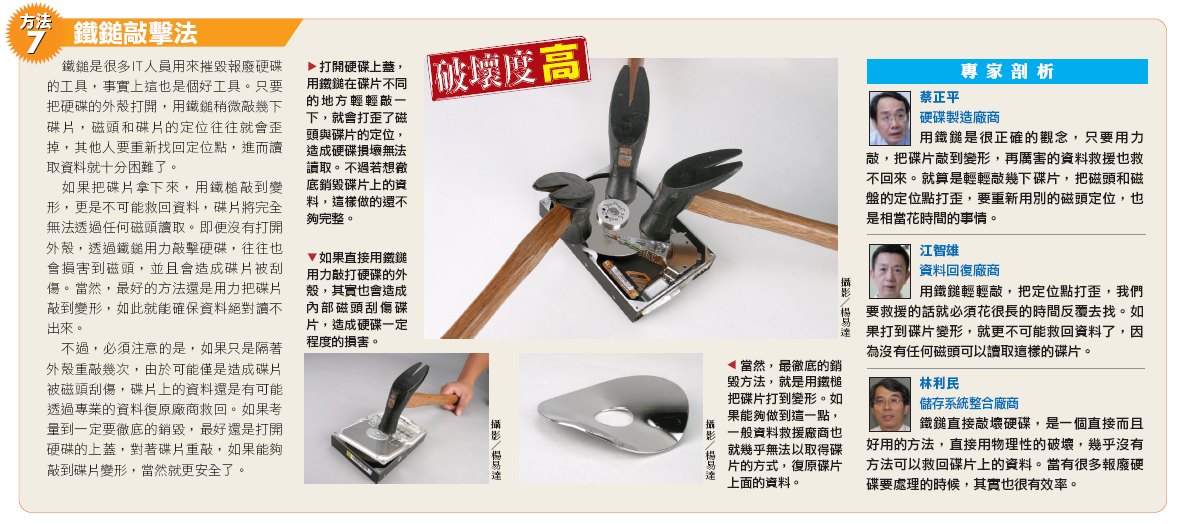
鐵鎚是很多IT人員用來摧毀報廢硬碟的工具,事實上這也是個好工具。只要把硬碟的外殼打開,用鐵鎚稍微敲幾下碟片,磁頭和碟片的定位往往就會歪掉,其他人要重新找回定位點,進而讀取資料就十分困難了。

如果把碟片拿下來,用鐵槌敲到變形,更是不可能救回資料,碟片將完全無法透過任何磁頭讀取。即便沒有打開外殼,透過鐵鎚用力敲擊硬碟,往往也會損害到磁頭,並且會造成碟片被刮傷。當然,最好的方法還是用力把碟片敲到變形,如此就能確保資料絕對讀不出來。

不過,必須注意的是,如果只是隔著外殼重敲幾次,由於可能僅是造成碟片被磁頭刮傷,碟片上的資料還是有可能透過專業的資料復原廠商救回。如果考量到一定要徹底的銷毀,最好還是打開硬碟的上蓋,對著碟片重敲,如果能夠敲到碟片變形,當然就更安全了。

56148_8_1_l.jpg

資料完全銷毀手冊(上)

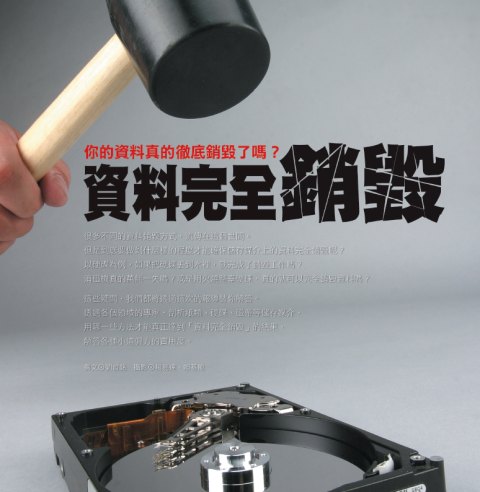
很多不同的資料銷毀方式,流傳在這個世間。但是到底要做到什麼樣的程度才能確保儲存媒介上的資料完全銷毀呢?

以硬碟為例,如果把硬碟丟到水裡,就完成了銷毀工作嗎?

56148_1_1_l.jpg

很多不同的資料銷毀方式,流傳在這個世間。

但是到底要做到什麼樣的程度才能確保儲存媒介上的資料完全銷毀呢?以硬碟為例,如果把硬碟丟到水裡,就完成了銷毀工作嗎?消磁機真的萬無一失嗎?或是用火燒整臺硬碟,真的就可以完全銷毀資料嗎?

這些疑問,我們都將透過這次的報導替你解答。透過各個領域的專家,剖析紙類、硬碟、磁帶等儲存媒介,用哪一些方法才能真正達到「資料完全銷毀」的結果,解答各種小道偏方的實用度。

資料真的徹底銷毀了嗎?
網路上常會看到一種摧毀硬碟的方法,那就是把硬碟丟到水裡泡水,但是這樣真的就完全不可能救回資料嗎?這可能不一定。

硬碟篇─徹底銷毀硬碟資料的7大方法
我們將要介紹7種不同銷毀硬碟的方法,這些方法分別是格式化、滴鹽酸、火燒、鐵鎚敲、泡水、消磁與刀割碟片。

紙類篇─碎斷式碎紙機才能夠完全銷毀紙張
如果碎紙時,依照文字排列的方向放入長條式碎紙機,結果就很有可能會是整行的字依然清晰可見,無法達成資料銷毀的效果。

磁帶篇─縱面剪斷才能確保磁帶銷毀
之所以要用縱面剪斷的方式,是因為如果採用橫面剪斷的方式,還是有可能讓有心人士從片段的磁帶取得資訊。


資料真的徹底銷毀了嗎?

英國電信(British Telecom,BT)曾經在2年前做過一個研究,他們和英、美多所大學合作,從不同的管道蒐集350顆被丟棄或是流通到二手市場的硬碟,然後研究是否能夠還原這些硬碟的原有的資料。研究的結果頗令人乍舌,他們發現,37%的硬碟(也就是約130顆硬碟)都能夠透過簡單的資料復原軟體,找回敏感的個人或企業資料。這些資料包括個人薪資、特定企業財務資料、信用卡號、醫療資料、信用卡申請資料、網路購物資料等。

根據調查機構Dataquest所做的統計,每一年全世界大概有1億5千萬顆硬碟被丟棄或汰換,如果和上一個研究的數字一起推算,儲存在這些硬碟裡的資料,若有37%沒有做好資料銷毀的處理,試想將有多少敏感資料有可能因此而外洩。其實資料沒有被完全銷毀的狀況非常普遍,幾年前,IEEE的安全與隱私期刊,刊登了2位麻省理工學院學生的一個小實驗。他們從二手市場購買了158臺硬碟,最後發現,只有12臺硬碟的前任使用者,有做到資料完全銷毀的工作,其他的硬碟透過資料復原軟體都能還原部分或全部的資料,甚至還有一顆硬碟內有5,000筆信用卡號。


你所知的資料銷毀方式,真的有辦法徹底銷毀嗎?
那麼,我們不禁要問,到底該怎麼做才算是完全把資料銷毀呢?這次的封面故事,就將以這個疑問為出發點,實驗各種不同常見儲存媒體的破壞方式,以各種狀況來考驗資料完全銷毀這件事情。並且會透過硬碟製造商、儲存系統整合廠商、資料復原專家,來探討每一種方式處理後,資料被救回的可能性。

之所以要這麼做,是因為很多我們以為可以徹底摧毀儲存媒介的破壞方式,往往並不是那麼正確與徹底。舉例來說,在網路上常會看到一種摧毀硬碟的方法,那就是把硬碟丟到水裡泡水,但是這樣真的就完全不可能救回資料嗎?這可能不一定。專門從事資料救援的凌威科技總經理江智雄就表示,如果用清水去泡,不見得能夠完全防止資料被復原,雖然有一定難度,但還是有可能透過像他們這樣的廠商,救回部分的資料。「真的要泡水的話,我會建議泡在泥水裡,這樣復原難度就更高了。」江智雄說。不過,事實上在2004年,日本富士通(Fujitsu)的子公司山形富士通,就曾經協助企業救回被泥水泡過的硬碟資料,雖然只是部分,但也證明了水攻的方式,可能不如我們想像中那麼徹底。除了這個例子之外,在山形富士通的案例中,還曾救回過碟片已經被鑽孔的硬碟內部分資料,這些事例都顯示出一個事實,如果連這樣的破壞方式,專業人士都還有可能救回部分資料,那麼到底平時我們認為可以銷毀儲存媒介的各種方法,是否真的那麼管用?


56148_1_2_l.jpg

日本的山形富士通公司,曾救回已經被泥水嚴重損害(如圖)的硬碟,成功還原部分資料。

56148_1_3_l.jpg

除了曾經救回被泥水浸泡過的硬碟外,山形富士通的案例中,也曾救回碟片已經被穿孔的硬碟內部分資料。

繼續以硬碟為例子,硬碟運作最重要的3大元件是碟片、馬達與磁頭,因此在考慮徹底銷毀硬碟上儲存的資料時,其實很重要的關鍵是對於碟片的損害程度,理論上,只要碟片上的磁粉受到損害,或是碟片因為外力而變形,儲存在上面的資料就難以回復了。所以在考慮用哪些方法才可以達到硬碟內資料的徹底銷毀時,就必須從這樣的角度來思考,讓一丁點資料回復的可能性都被屏除。

那如果用火呢?自三國時代以來,中國的軍師總是特別愛用火計,比如說陸遜曾經火燒蜀營300里;孔明也有過以火大破藤甲兵……,雖然紙類和磁帶用火來銷毀十分有效,但硬碟可能就不完全是這麼一回事了。硬碟製造商日立環球儲存科技(Hitachi GST)技術支援協理蔡正平表示,一般來說硬碟的日常存放耐熱溫度為攝氏80~90度,所以直接用一般的點火方式來烤硬碟,不見得能夠摧毀硬碟內的資料。直接用高溫的噴槍對著硬碟內部的碟盤表面燒,或是以超高的溫度燒到整個硬碟變形,可能才能達到完全摧毀硬碟的效果。另一家硬碟製造商希捷(Seagate)也有類似看法,他們透過書面回覆指出,用一般的火燒方式來焚燒硬碟,不見得能夠完全摧毀硬碟的資料,如果沒有燃燒完全,還是有極小的可能被有心人士取得沒有受損的碟片,進而取得硬碟內存的資料。

日立環球儲存科技技術支援協理蔡正平說:「硬碟的存放耐熱溫度為攝氏80~90度,所以火燒硬碟,不見得能摧毀硬碟內的資料。」


將磁區全部覆蓋的低階格式化才能真正銷毀資料
而在硬碟還能正常運作的狀況下,格式化是否能夠確保資料完全銷毀呢?事實上格式化分為兩種,一般透過作業系統指定硬碟磁區為可寫入狀態的格式化,被稱為高階格式化,在這樣的狀況下,其實舊有資料並沒有真正被刪除,只是被指定為「可寫入」的區域,所以透過類似FinalData等軟體,還是可以找到硬碟的目錄檔,進而復原資料。儲存系統整合廠商臺灣IBM資深資訊工程師林利民表示,真正的格式化,必須要使用俗稱低階格式化的方式,也就是將磁區全部用其他的資料寫入覆蓋,如此才能達到資料完全被刪除的效果。林利民說:「如果我只能選擇一種硬碟的破壞方式,我會選擇使用低階格式化,全部覆寫之後,資料要救回來就非常困難了。」

臺灣IBM資深資訊工程師林利民說:「必須要使用低階格式化的方式,將磁區全部用其他的資料寫入覆蓋才能徹底銷毀資料。」

事實上,林利民的此一看法也被硬碟製造商所證實,蔡正平指出,如果硬碟還可以運作,在現在硬碟容量越來越大,磁軌密度越來越高的狀況下,低階格式化將所有檔案覆寫的方式,只要一次,資料幾乎就不可能被救回。過去的硬碟由於磁軌間的間隔較大,也沒有專門進行低階格式化的軟體,所以自行以資料覆蓋的方式,還是有可能會有少數磁軌的資料沒有被覆蓋,讓這些資料有機會被救回。但是在現在的硬碟上,這些都已經不是問題,低階格式化幾乎是確保資料不外洩的最好方法。不過低階格式化也有其缺點,因為必須將所有的磁區都寫入資料覆蓋一次,所以低階格式化需要花費的時間也比較久,往往都需要數小時才能完成。

而除了硬碟之外,許多其他常用的資料儲存媒介,其實在銷毀上也有很多必須注意的事情。舉例來說,紙類資料如果順著行文方向放入長條式的碎紙機,那麼很有可能碎出來的字還清晰可見,甚至整行字都可閱讀,如此一來,就失去了原本銷毀資料的意義。

無論如何,硬碟很明顯的是目前最難銷毀的儲存媒介,為了真正去驗證每一種硬碟銷毀方法,我們將會在接下來的篇幅介紹7種不同破壞硬碟的方式,包括用鐵鎚、鹽酸、消磁、刀割等,並且提供專家對每一種方法的評論,供大家參考。此外,也將針對碎紙機器的差異,以及相對較易銷毀的磁帶,做一些銷毀手法的介紹。

56148_1_4_l.jpg

透過一些簡單的工具,其實就能夠達到銷毀各種不同儲存媒介的目的。較為脆弱的紙類和磁帶,尤其容易以消磁、刀刃或火燒的方式處理。至於硬碟則較為困難,必須考量到摧毀碟片的程度,才能不留下任何讓別人取回資料的機會。


轉自ITHOME

CDRoller - 光碟救援軟體

jb0ocz.jpg

CDRoller是一款功能強大、簡單易用且低花費的CD/DVD/BD資料救援軟體。


提供了極強的光碟讀取和糾錯能力,可以用來恢復使用"拖放"方式刻錄的 CD/DVD/BD (如Roxio (Adaptec) DirectCD 和 Ahead Nero software)中的資料;方便的抓音軌轉換編碼功能;光碟分析和讀寫等檢測工具;快速方便的建立CD分類庫和搜索功能;從劃傷、損壞或失效的光碟中恢復資料;具有與Windows資源管理器類似的用戶操作界面等特性。

CDRoller 是多功能的光碟工具,主要功能有可複寫式光碟 UDF 資料檔讀取、光碟音樂音軌抓取、光碟多媒體分析/測試工具、光碟資料救回、光碟映像檔製作..等等,支援的 CD 及 CD-R 格式:CD-DA、CD-ROM、CD-WO、CD-RW、CD-ROM XA、混合模式光碟、多重區段壓片光碟。

- Fault-tolerant 資料光碟瀏覽及內建遺失資料音軌搜尋功能的內容讀取工具;
- 區段(Session)選擇工具,取回多重區段壓片光碟的所有區段;
- UDF 讀取工具具有額外的移失資料救回及搜尋能力;
- CD Data Rescue 的資料救援功能,可以將無法讀取的光碟檔案、資料夾救回;
- 抓取數位音樂光碟音軌(將音樂光碟轉成 WAV 檔);
- 光碟多媒體檔案測試及分析;
- 具有強大搜尋選項的快速、簡易使用的光碟多媒體分類功能;


CDRoller is a powerful, easy-to-use and low-cost toolset for CD/DVD data recovery. CDRoller supports industry-standard ISO 9660 file system, including Microsoft's extensions for long file names support, so-called Joliet extensions. CDRoller also supports the discs formatted in UDF file system, including versions 1.02, 1.50, 2.0, 2.01 and also so-called UDF Bridge format. Support of wide set of CD, CD-R, CD-RW and DVD formats such as: CD-DA, CD-ROM, CD-WO, CD-ROM XA and Mixed-Mode CD, Stamped multisession CD, CD-MRW ("Mt. Rainier" CD-RW), DVD-ROM, DVD-R, DVD-RW, DVD+R, DVD+RW, DVD-RAM.


CDRoller_1.png


Key Features:


Effectively retrieves the lost data from the discs created by "drag and drop" CD/DVD/BD writing software, such as well-known Sonic (Roxio, Adaptec) and Ahead Nero software packages, CeQuadrat's PacketCD, DLA, B's CLiP and others.
Reads unfinalized ("open", "left as-is") CDs and DVDs, including the discs with Microsoft's Live File system.
Recovers DVD movies and photos, created by a wide set of standalone devices that record directly onto disks: Hitachi, Canon, Panasonic, Samsung and Sony DVD camcorders as well as standalone video recorders.
Splits the recovered VOB or VRO video files into a several clips (scenes), automatically converting a "raw" DVD-video into generic MPEG files without loss of quality. Specially tested on the discs, recorded by Hitachi DVD camcorders.
Burns a new DVD with recovered video that can be played back in the most DVD players.
Recovers CD data written by Sony Mavica CD digital cameras.
Includes a fault-tolerant UDF Reader. Provides direct access to UDF discs, including CDs and DVDs written by old versions of Roxio (Adaptec) DirectCD and Drag-To-Disk. Finds and retrieves accidently deleted files, files located in the corrupted folders, files on incorrectly closed disks, etc.
"On-the-fly" unpacks the files initially compressed by Roxio (Adaptec) DirectCD.
Retrieves back up files from the discs recorded in several stages (multisession discs).
Includes a built-in CD/DVD/BD data burner. There is no need to run third-party CD/DVD/BD mastering software if you wish to burn a new DVD-video disc or backup your files and folders immediately after recovery. The "Burn" option is integrated into a common shell. Just write a new disc with recovered data shortly, without leaving CDRoller!
Erases CD, DVD and BD re-writable media. Supports quick and full erase methods.
Examines disc sectors at low level. Displays the sector content in text, binary, hexadecimal or unicode mode. It also scans all sectors of a disc (selected track or file) for particular data. Recommended for engineering purposes and also for law enforcement and forensic investigators.
Identifies the lost files on ISO/Joliet discs with the damaged file system (volume descriptors, path tables and directories), using the raw data only.
Rescues the data from scratched, damaged or defective discs.
Provides direct access to hardware, bypassing the Windows File System. Looks for the lost tracks (sessions) every time when you insert a new disc into the drive. Supports SCSI Pass Through Direct (SPTD) layer as alternative method under Windows 2000/XP/2003/Vista.
Digitally extracts audio tracks into a wide set of wave formats.
Tests disc readability.
Extracts ISO Image file. Burns ISO Image file to a new disc.
Catalogs files and folders into CD/DVD library.
All features are integrated into a common and easy-to-use intuitive shell.


下載


.


話說


最近流行的關鍵字有藏著讓BLOG人氣暴增的因素在裡面
版主用了最簡單的方法試著去測試此方法是否可行,
便產生了這邊測試文章以下為內容關鍵字
數位鑑識 數位取證
電腦鑑識 電腦取證 計算機取證
forensics
資料還原 資訊還原 資料重現 數據還原 數據重現 資料救援 資訊救援 數據救援 惡意程式 資訊安全
病毒 木馬 蠕蟲 USB 無法開機 藍屏 CEH CHFI 駭客 鑑識工具 資安工具 駭客工具
1. Computer Forensics and Investigations as a Profession 。2. Understanding Computer Investigations 。3. Working with Windows and DOS Systems 。4. Macintosh and Linux Boot Processes and Disk Structures。5. The Investigator’s Office and Laboratory。6. Current Computer Forensics Tools。7. Digital Evidence Controls 。8. Processing Crime and Incident Scenes 。9. Data Acquisition 。10. Computer Forensic Analysis 。11. E-mail Investigations 。12. Recovering Image Files 。13. Writing Investigation Reports 。14. Becoming an Expert Witness。15. Computer Security Incident Response Team 。16. Logfile Analysis 。17. Recovering Deleted Files 。18. Application Password Crackers。19. Investigating E-Mail Crimes 。20. Investigating Web Attacks。21. Investigating Network Traffic 。22. Investigating Router Attacks。23. The Computer Forensics Process 。24. Data Duplication。25. Windows Forensics。26. Linux Forensics。27. Investigating PDA。28. Enforcement Law and Prosecution。29. Investigating Trademark and Copyright Infringement

一百萬人的故事:一枕清霜 O
影片:好好搜! how2so! O
無名:酷玩意部落格 O
惡作劇2吻:TVdeo - 免費線上電視機 O
sexygril图片: 部觀門(不關門) O
sexygril:好好搜吧! O
鹽埔國中:BawBaw 私人招待所 O 李妍瑾:Xuite日誌:小奇moody分享http: O
食譜: language=JavaScript>top.location='/ O
國中女生打架:wotupset O
美女:Rainbow Channel O
破解:Xuite日誌:完美世界 O
桌布:就愛手機桌布-新浪部落 O
冠希:嘿!Leon奇異報告 - :: PIXNET BL O
花蓮:花蓮旅人誌:花蓮旅遊部落� O
統一發票97年1 2月:PIXNET BLOG :: shaw的天空 O
這裡發現愛:運動旅遊天空(Sport Travel Yam) O
林靜珊: 分享國度 - Powered by Discuz! O
正妹:正妹星球!! O
產生器: Chris' Blog --- Nakoruru's L O 李妍瑾 戚風蛋糕 郭大俠 電玩快打咖哩 愛玉之夢遊仙 清泉崗空軍基 2008年星座運� 晃士家
長谷川京子 www.youtube.com.tw 醫龍2 utobe
麥當勞外送電 便當狗 無名相簿密碼破解程式、無名小站相簿、破解無名密碼、無名密碼破解、破解無名相簿密碼、下載破解無名密碼程式、無名密碼破解程式、破解無名相簿密碼保護、 破解無名、wretchxd、破解無名小站密碼、如何破解無名相簿密碼、joost、網路電視、邀請函、卓義峰、校園歌喉戰、校園歌喉戰影片、卓義峰部落 格蕭敬騰、超級星光大道、超級星光大道影片、蕭敬騰+背叛、楊宗緯、楊宗緯+新不了情、蕭敬騰部落格、超級星光大道+蕭敬騰gogobox、 gogobox+下載、gogobox+教學、wii 、BlogAD 、勁舞團、勁舞雙視窗、勁舞噴嚏、勁舞女王、 破解badongo流量、卡巴斯基破解、註冊碼、序號無名相簿密碼破解程式、無名小站相簿、破解無名密碼、無名密碼破解、破解無名相簿密碼、下載破解無名 密碼程式、無名密碼破解程式、破解無名相簿密碼保護、破解無名、wretchxd、破解無名小站密碼、如何破解無名相簿密碼、joost、網路電視、邀請 函、卓義峰、校園歌喉戰、校園歌喉戰影片、卓義峰部落格蕭敬騰、超級星光大道、超級星光大道影片、蕭敬騰+背叛、楊宗緯、楊宗緯+新不了情、蕭敬騰部落 格、超級星光大道+蕭敬騰gogobox、gogobox+下載、gogobox+教學、wii 、BlogAD 、勁舞團、勁舞雙視窗、勁舞噴嚏、勁舞女王、 破解badongo流量、卡巴斯基破解、註冊碼、序號無名相簿密碼破解程式、無名小站相簿、破解無名密碼、無名密碼破解、破解無名相簿密碼、下載破解無名 密碼程式、無名密碼破解程式、破解無名相簿密碼保護、破解無名、wretchxd、破解無名小站密碼、如何破解無名相簿密碼、joost、網路電視、邀請 函、卓義峰、校園歌喉戰、校園歌喉戰影片、卓義峰部落格蕭敬騰、超級星光大道、超級星光大道影片、蕭敬騰+背叛、陳冠希、 陳冠希鹹濕照、陳冠希 張柏芝裸照、楊宗緯、楊宗緯+新不了情、蕭敬騰部落格、超級星光大道+蕭敬騰gogobox、gogobox+下載、gogobox+教學、wii 、BlogAD 、勁舞團、勁舞雙視窗、勁舞噴嚏、勁舞女王、 破解badongo流量、卡巴斯基破解、註冊碼、序號無名相簿密碼破解程式、無名小站相簿、破解無名密碼、無名密碼破解、破解無名相簿密碼、下載破解無名 密碼程式、無名密碼破解程式、破解無名相簿密碼保護、破解無名、wretchxd、破解無名小站密碼、如何破解無名相簿密碼、joost、網路電視、邀請 函、卓義峰、校園歌喉戰、校園歌喉戰影片、卓義峰部落格蕭敬騰、超級星光大道、超級星光大道影片、蕭敬騰+背叛、楊宗緯、楊宗緯+新不了情、蕭敬騰部落 格、超級星光大道+蕭敬騰gogobox、gogobox+下載、gogobox+教學、wii 、BlogAD 、勁舞團、勁舞雙視窗、勁舞噴嚏、勁舞女王、 破解badongo流量、卡巴斯基破解、註冊碼、序號無名相簿密碼破解程式、無名小站相簿、破解無名密碼、無名密碼破解、破解無名相簿密碼、下載破解無名 密碼程式、無名密碼破解程式、破解無名相簿密碼保護、破解無名、wretchxd、破解無名小站密碼、如何破解無名相簿密碼、joost、網路電視、邀請 函、卓義峰、校園歌喉戰、校園歌喉戰影片、卓義峰部落格蕭敬騰、超級星光大道、超級星光大道影片、蕭敬騰+背叛、楊宗緯、楊宗緯+新不了情、蕭敬騰部落 格、超級星光大道+蕭敬騰gogobox、gogobox+下載、gogobox+教學、wii 、BlogAD 、勁舞團、勁舞雙視窗、勁舞噴嚏、勁舞女王、 破解badongo流量、卡巴斯基破解、註冊碼、序號無名相簿密碼破解程式、無名小站相簿、破解無名密碼、無名密碼破解、破解無名相簿密碼、下載破解無名 密碼程式、無名密碼破解程式、破解無名相簿密碼保護、破解無名、wretchxd、破解無名小站密碼、如何破解無名相簿密碼、joost、網路電視、邀請 函、卓義峰、校園歌喉戰、校園歌喉戰影片、卓義峰部落格蕭敬騰、超級星光大道、超級星光大道影片、蕭敬騰+背叛、楊宗緯、楊宗緯+新不了情、蕭敬騰部落 格、超級星光大道+蕭敬騰gogobox、gogobox+下載、gogobox+教學、wii 、BlogAD 、勁舞團、勁舞雙視窗、勁舞噴嚏、勁舞女王、 破解badongo流量、卡巴斯基破解、註冊碼、序號無名相簿密碼破解程式、無名小站相簿、破解無名密碼、無名密碼破解、破解無名相簿密碼、下載破解無名 密碼程式、無名密碼破解程式、破解無名相簿密碼保護、破解無名、wretchxd、破解無名小站密碼、如何破解無名相簿密碼、joost、網路電視、邀請 函、卓義峰、校園歌喉戰、校園歌喉戰影片、卓義峰部落格蕭敬騰、超級星光大道、超級星光大道影片、蕭敬騰+背叛、楊宗緯、楊宗緯+新不了情、蕭敬騰部落 格、超級星光大道+蕭敬騰gogobox、gogobox+下載、gogobox+教學、wii 、BlogAD 、勁舞團、勁舞雙視窗、勁舞噴嚏、勁舞女王、 破解badongo流量、卡巴斯基破解、註冊碼、序號無名相簿密碼破解程式、無名小站相簿、破解無名密碼、無名密碼破解、破解無名相簿密碼、下載破解無名 密碼程式、無名密碼破解程式、破解無名相簿密碼保護、破解無名、wretchxd、破解無名小站密碼、如何破解無名相簿密碼、joost、網路電視、邀請 函、卓義峰、校園歌喉戰、校園歌喉戰影片、卓義峰部落格蕭敬騰、超級星光大道、超級星光大道影片、蕭敬騰+背叛、楊宗緯、楊宗緯+新不了情、蕭敬騰部落 格、超級星光大道+蕭敬騰gogobox、gogobox+下載、gogobox+教學、wii 、BlogAD 、勁舞團、勁舞雙視窗、勁舞噴嚏、勁舞女王、 破解badongo流量、卡巴斯基破解、註冊碼、序號無名相簿密碼破解程式、無名小站相簿、破解無名密碼、無名密碼破解、破解無名相簿密碼、下載破解無名 密碼程式、無名密碼破解程式、破解無名相簿密碼保護、破解無名、wretchxd、破解無名小站密碼、如何破解無名相簿密碼、joost、網路電視、邀請 函、卓義峰、校園歌喉戰、校園歌喉戰影片、卓義峰部落格蕭敬騰、超級星光大道、超級星光大道影片、蕭敬騰+背叛、楊宗緯、楊宗緯+新不了情、蕭敬騰部落 格、超級星光大道+蕭敬騰gogobox、gogobox+下載、gogobox+教學、wii 、BlogAD 、勁舞團、勁舞雙視窗、勁舞噴嚏、勁舞女王、 破解badongo流量、卡巴斯基破解、註冊碼、序號
黎礎寧、自殺、Ivy、星光一班、假冒年齡、山頂洞人、楊宗緯、洋蔥、蕭敬騰、省話一哥、陶晶瑩、陶子姐、陶子、袁惟仁、小胖老師、凡人二重唱、PK賽、娛樂綜藝節目獎、第四季優良電視節目、林宥嘉、周定緯、潘裕文、盧學叡、劉明峰、華研國際音樂、楊楊、星光二班、第二屆、2007年7月20日、2008 年1月25日、賴銘偉、梁文音、葉瑋庭、吳忠明、林宜融、楊翰傑、環球音樂、第三屆、2008年2月1日、2008年8月22日、徐佳瑩、林芯儀、黎礎寧、簡鳳君、賴聖恩、楊翰傑、星光三班、星光四班、星光五班、星光同學會、新竹楊楊、星光幫專輯、星光幫歌詞、星光大道影片、重播、Arc、 ArcYang、冠軍賽、第一季、第二季、第三季、第四季、第五季、林志炫、張宇、忘情水、Alisa im.tv KUSO MV Pixnet Xuite YouTube 八卦 吳忠明 娛樂 影片 實踐楊 新聞 星光 星光3 星光二班 星光幫 曾沛慈 李千娜 林健輝 林宜融 林宥嘉林道遠 梁文音 楊宗緯 無名 第二屆星光 節目 網站 網路 葉瑋庭 蕭敬騰 藝人 評論 賴銘偉 超級星光大道 部落格 電視 音樂 魏如昀 黃美珍無名人氣外掛、無名衝人氣、無名衝人氣程式、無名人氣外掛下載、無名洗人氣外掛、無名破解、無名樣式、無名css、無名網誌、無名相簿破解程式下載、破解檔下載、無名抓圖、無名抓圖軟體、楊楊、楊翰傑、無名抓圖程式、無名破解密碼軟體、BlogAD外掛、BloggerAds外掛、網路賺錢、無名網誌賺錢、楊楊、楊翰傑、用無名網誌賺錢、用網誌賺錢、連點程式、部落格廣告外掛、部落客廣告行銷、廣告行銷、楊楊、楊翰傑、廣告賺錢、廣告點擊、部落格廣告連點程式、無名外掛、無名程式、無名破解右鍵、無名相簿、無名正妹、無名正妹的相簿、無名衝人氣程式、無名衝人氣、Arc、ArcYang、無名衝人氣密技、無名留言板、留言板、楊楊、楊翰傑、聊天室、無名網誌、無名首頁、無名衝人氣秘笈、祕笈、新竹楊楊、 wretch、無名帥哥相簿、無名型男相簿、無名潮男相簿、無名宅男相簿、無名正妹相簿、無名潮女相簿、無名美女相簿、blog 網路賺錢 部落格 部落格經營 部落格經營講義 部落格設計 部落格廣告 部落格教學 實踐楊 關鍵字 關鍵字廣告 行銷 廣告點擊 撰寫部落格 教學 五月天、楊丞玲、蔡依玲、王心玲、羅百吉、F4、女F4、棒棒堂男孩、模范棒棒堂、黑澀會美眉、我愛黑澀會、黑澀會、鬼鬼、大牙、公主小妹、周杰倫、林宥嘉、陶喆、李安、馬英九、范逸臣、楊丞林、賀軍翔、鄭元暢、羅傑斯、楊楊、本區排行、林俊傑、吳克群、王力宏、Mc HotDog、羅志祥、周定緯、新竹楊楊、陳奕迅、潘裕文、光良、李玖哲、黃靖倫、許仁杰、伍佰、李聖傑、劉德華、鄭中基、胡彥斌、蕭敬騰、張學友、潘瑋柏、盧廣仲、曹格、卓義峰、蘇永康、陶喆、張震嶽、古巨基、翁立友、張棟樑、張宇、蔡小虎、方大同、小宇、陳小春、康康、Arc、ArcYang、王傑、新竹楊楊、何維健、蕭閎仁、品冠、蔡旻佑、楊翰傑、張敬軒、游鴻明、任賢齊、張信哲、林宇中、張雨生、林峰、郭富城、庾澄慶、楊培安、楊翰傑、王識賢、謝霆鋒、蕭煌奇、洪卓立、劉嘉亮、側田、邰正宵、阿杜、呂建忠、許志安、吳宗憲、張智成、楊翰傑、周華健、鄭源、周傳雄、羅時豐、陳雷、江志豐、言承旭、齊秦、黎明、伍思凱、易桀齊、費玉清、黃立行、陳曉東、帥哥、型男、正妹、美女、靚女、辣妹、密技、加速器、勁舞團加速器、勁舞團連P、勁舞團小雞、新竹楊楊、勁舞團大地、勁舞團最新外掛、勁舞團連噴、勁舞團開房、勁舞團死亡舞步、8K、4K、勁舞團完美如樸、勁舞團飄飄、勁舞團影片、勁舞團視窗化、紫幽、楊翰傑、幽靈、外掛、私服、Arc、ArcYang、RO、爆爆王外掛、洗錢程式、自動喝水、自動開房、楓之谷、打怪程式、吸怪程式、扣名聲程式、自動補水補魔程式、旋轉木馬、防毒、掃毒、解毒、破解黑暗、卡巴拉島、卡巴拉島外掛、楓之谷達人、楊翰傑、楊楊、爆爆王達人、勁舞團達人、唯舞獨尊外掛、唯舞獨尊達人、瘋魔獵人外掛、超強程式、外掛天地、灰色按鈕、按鍵精靈、修正程式、變態程式、爆爆王、爆爆王自動練功、爆爆王穿牆、穿牆破解、穿牆、註冊碼、神盃、忍者哈特利、海綿寶寶、派大星、烏龍派出所、哆啦A夢、聖鬥士星矢、海賊王、航海王、魯夫、娜美、喬巴、索隆、騙人布、三千世界、大絕、結局、隱藏結局、回來了、離開了、小叮噹、大雄、靜香、宜靜、小夫、阿福、Arc、ArcYang、胖虎、技安、野藤新之助、小新、雅虎、Yahoo、yahoo、即時通、MSN、MSN外掛、MSN輪撥器、MSN大頭貼、即時通外掛、楊楊、楊翰傑、即時通多開、即時通大頭貼、偷即時通大頭貼、偷即時通圖、偷圖程式、偷大頭貼程式、搶圖程式、Arc、ArcYang、搶別人圖、搶即時通圖、楊楊、楊翰傑、搶別人的即時通大頭貼、搶別人即時通的圖、Plus!、MSN Plus!、Shell、外掛、MSN Plus 外掛、查詢誰封鎖我、誰封鎖我、怎麼知道、封鎖、聯絡人、通訊錄、電腦、電影、圖片、電腦、電視、電冰箱、電死人、奇摩、GOOGLE、Google、Googel、咕狗、估狗、估狗大神、咕狗大神、google大神、 Google大神、GOOGLE大神、楊楊、楊翰傑、論壇、過年、ADSL、IP位置、鎖IP、打人、笑話、罐頭訊息、手機、筆電、新聞、記憶卡、IE 7、遊戲、美食、MP3、MP4、player 11、英文、中文、翻譯、修正器、書籤、分頁、幹、吹喇叭、笨蛋、剪輯、剪影片、楊翰傑、楊楊、燒錄、Arc、ArcYang、燒光碟、破解檔、完整版、中文版、繁體中文、簡體中文、破解板、破解、密碼、序號、cdkey、key、白痴、多視窗、跑馬燈、自動發言、自動開機、自動關機、彎彎、網路、宅男、宅女、腐女、腐妹、家裡蹲、語法、游標語法、連結、音樂語法、影片、鞋子、拍賣、ATM、學校、圖片、大頭貼、微軟、OFFICE、可愛游標、產生器、轉檔、MP3切割、鈴聲、星光幫、電音帝國、終極DJ、混音、原來我不帥、蛋頭網、阿宅醒醒、外掛聯合國、懷孕禁忌、油價、益智遊戲、樂透溫泉、會館、彎彎、戀愛運、luna、舒淇、3C blog Google KUSO Pixnet Web2.0 Xuite YouTube 人物 大聯盟 楊翰傑 楊楊 小說 中時電子報 中國 心情 日本 日記 台灣 生活 楊翰傑 楊楊 自由電子報 投資亞洲 兩性 社會 股票 金融 政治 相簿 科技 美女 美食 英文網頁 音樂 食記 食譜 娛樂 旅行 時事 時尚 校園 財經 馬英九 楊翰傑楊楊 健康 動漫 商品 國際 理財 產業 設計 軟體 部落格 棒球 無名 評論 新竹楊楊 奧運 愛情 搞笑 新聞 照片 經濟 運動 ArcYang 遊記 遊戲 電視 楊翰傑 楊楊 電腦 電影 漫畫 網站 網路 影片 閱讀 親子 餐廳 聯合新聞網 購物 簡體網頁 職場 寵物藝人 藝文 攝影 im.tv Web2.0 YouTube 交響情人夢 動漫 動畫 名偵探柯南 國光幫幫忙 大學生了沒 大小愛吃 女人我最大娛樂 娛樂百分百 康熙來了 影片 我愛黑澀會 我猜 我猜我猜我猜猜猜 搞笑 日本編 星光幫 時尚 棒棒堂 楊丞琳 模范棒棒堂 爆笑 科技第二屆 節目 簡體網頁 網路 羅志祥 美妝 美容 美食 ArcYang 藝人 超級星光大道 電視 音樂 食譜 實踐楊 ArcYang 精華區分類標籤全部 楊翰傑 楊楊 女人我最大 康熙來了 大小愛吃 大學生了沒 其他綜藝節目 我愛黑澀會 超級星光大道 新竹楊楊 模范棒棒堂娛樂百分百 楊翰傑 楊楊 我猜我猜我猜猜猜 愛上陶花園 卡通動畫 型男大主廚 實踐楊 美味鑑定團 國光幫幫忙 王牌大賤諜 三隻小豬 FG美人教室 楊翰傑 楊楊 日劇 最後的朋友 舞林大道 實踐楊 無敵青春克 blog deathhell Flash KUSO ArcYang Pixnet RSS Web2.0 Xuite 倒數 動漫 天空部落 娛樂 小玩意 工具 影片 新聞 日曆 時鐘 漫畫 無名 特效 環保 生活癒療 社群 科技 網站 網路 網頁裝飾 藝文 設計 貼紙 軟體 遊戲 部落格 楊翰傑 楊楊 部落格小玩意 電影 電玩 電腦 音樂 日曆 時鐘遊戲 裝飾 圖像 影音 工具 便利 統計 倒數 綜合 其他 社群 通訊 19 abian ashs blogparts COSMEDE E.m.B.A earworm FIGB FLOMO http://mpwri Jolin KMT LOVE national puti respect SPN sponsor TAIWAN teacher whale 不良笑花 不要台灣省 中國 主權 人文社會關懷 人權 健康 公平 公投 共匪 創意 動物 勿通匪類 半熟宣言 協尋 叛變 台北 台灣 台灣主權台灣國 實踐楊 台灣當家作主 台灣部落客福利聯盟 司法人權 和平 咩樂 回應 回歸主流 新竹楊楊 國際 執法過當 報告蔣總統 學生 富樂夢尷尬網誌寫作者互助會 張泰山 愛的練習語 手作 批判 搖滾 政治迫害 教育 旅遊 晨間日記 楊丞琳 殘念 民主 民主退步 法治 火把 無名無毒 ArcYang 玉山網聚廳, 環保橡皮擦 省錢 省錢達人 第三種知識分子 總統 耶穌 腦殘禁止 葉君璋 蔡依林 蘇治芬 行道會 解救台灣言論自由 賣台 赤西仁 追焦照 部落格掛件 重型機車 野草莓 野草莓學運 野草莓運動 陳水扁 雅虎 集會遊行法 雲林 電影 馬英九 高中生

國家級標準銷毀儲存媒體資料

坊間充斥著各式各樣關於銷毀儲存資料的方法,如果擔心這些土法煉鋼的偏方不合實際需要,可參照美國國防部認可的標準,實現更徹底、安全的資料銷毀作業


低階格式化、泡水、焚燒、消磁、敲擊使碟片變形等等,是坊間流傳的種種如何徹底銷毀儲存媒體資料的方法,但對企業來說,這些方法的適用性可能大有問題。

一來許多方法的有效性並無法得到確認,而且缺乏明確的操作標準來指引使用者,如依據怎樣的程序執行、執行到怎樣的程度,才能達到銷毀資料的效果;二來大多數儲存媒體(特別是硬碟)在設計上都已考慮防護撞擊、變形與屏蔽外部磁力影響的問題,要透過物理破壞來銷毀資料,實際執行也不容易。

為了實現更有效、執行上也更明確可行的資料銷毀工作,參考各國官方認可的資料銷毀程序與規範,並導入遵循規範的產品,將是更適合企業環境的作法。

在資料銷毀這個領域,美國國防部的DOD 5220.22-M標準或許是最廣為人知,也是應用最廣的一套規範。

認識美國國防部DOD 5220.22-M標準
許多人都把DOD 5220.22-M直接當作資料清除與銷毀的標準,事實上這種看法有所誤解。DOD 5220.22-M是美國國防部在「國家工業安全計畫(National Industrial Security Program)」下,所制定的「國家工業安全計畫操作手冊(National Industrial Security Program Operating Manual,NISPOM)」。

NISPOM這份手冊涵蓋的範圍很廣,資料清除與銷毀只占舊版手冊(95年1月發布,97年7月修正)第8章第3節的一部分,其中提供了一個清除與銷毀資料方法的參考矩陣表。而最新版(2006年2月發布)NISPOM中,資料清除與銷毀更只剩兩小段,清除與銷毀資料的方法矩陣表也被刪除,改由國防部所屬國防保安處(Defense Security Service,DSS)提供資料清除與銷毀方法參考矩陣表(Clearing and Sanitization Matrix,C&SM)。

儘管現在的新版DOD 5220.22-M已不再提供任何具體的資料清除與銷毀方法,但舊版手冊的方法仍有參考價值。其中定義了兩種清除資料需求:

● 清除(Clearing):在重新使用媒體之前,徹底刪除媒體中資料的程序,且在清除媒體中資料之前,作業環境可提供可接受的保護等級。舉例來說,所有內部記憶體、緩衝區或其他可重複使用的記憶體,都必須執行清除,以有效杜絕讀取先前儲存的資料。

● 銷毀(Sanitization):在重新使用媒體之前,徹底刪除媒體中資料的程序,且在銷毀媒體中資料之前,作業環境無法提供可接受的保護等級。例如,當資訊系統資源從保密資訊管制下釋出、或釋出到較低的保密層級使用前,都必須執行資料銷毀。

執行資料清除或銷毀的方法
無論舊版DOD 5220.22-M或後來的DSS C&SM,均分別針對磁帶、磁碟、光碟、記憶體等四種類型的儲存媒體,以及同樣會暫存資料的印表機,提出了17種刪除資料的方式。而這些方式中,有15種適用於儲存媒體,又可分為消磁、覆寫、紫外線刪除與物理摧毀等基本方式。

適用的儲存媒體類型
四種儲存媒體包括:

● 磁帶:分為Type I、II、III等3類,Type I指磁化記錄時的磁場強度為350厄斯特(oersted,磁場強度單位,縮寫為Oe)以下,Type II介於351與750Oe之間,Type III則大於750Oe。

由於DOD 5220.22-M這張參考表制定的時間相當早(距今已超過10年),因此前述磁帶磁化磁場強度標準已與當前的產品有相當落差,如目前最普遍使用的LTO-3、4磁帶,磁場強度便分別高達2600與2710Oe。

● 磁碟:包括Bernoulli式磁碟、軟碟、不可移動的硬碟與可移動的硬碟等4種類型。

● 光碟:包括可多次讀寫、唯讀與一次寫入多次讀取(WORM)等3種。

● 記憶體:包括動態隨機存取記憶體(DRAM)、靜態隨機存取記憶體(SRAM)、唯讀記憶體(ROM)、可程式化唯讀記憶體(PROM)、可程式化可抹除唯讀記憶體(EPROM)、快閃EPROM(Flash EPROM)、電子可變唯讀記憶體(EAPROM)、電子可抹除唯讀記憶體(EEPROM)、非揮發性RAM(NOVRAM),還有古老的磁芯、磁泡、磁阻與鍍磁線等13種記憶體。

而針對前述四類儲存媒體,分別有以下幾種徹底刪除資料的方法:

● 消磁:可適用於磁帶與磁碟,分為Type I與Type II兩種層次的消磁,對應於Type I、II兩種類型的磁帶。

使用消磁要特別注意二件事,首先某些磁帶與抽取式硬碟(如LTO磁帶與Zip碟片)內含有出廠時預錄的訊息,若強制執行消磁而使這些訊息消失,這些媒體將無法再被重覆使用。其次是美國國防部的Type I/II消磁標準已太過老舊,要對當前的磁帶實施消磁,最少也得使用消磁能力2500~3000Oe的消磁機;若要消磁硬碟,則需要的消磁能力將達到 4000~5000 Oe以上。

● 覆寫:包括幾種不同方法,如把所有儲存定址位置都填入單一字元;所有定址位置都填入單一字元後,再隨機填入字元;以隨機方式覆寫所有定址位置,所有位置都填入二進位0值、所有位置都填入二進位1值;或事先透過製造商提供的工具刪除晶片中資料,然後把所有定址位置都填入單一字元,然後重複三次等等。

● 紫外線照射刪除與移除電源
紫外線照射刪除適用於EPROM,移除包括電池在內的所有電源則適用於DRAM、NOVRAM與SRAM。

● 物理摧毀:包括使儲存媒體破裂、焚化、徹底粉碎、切成條狀與融化等方式。除了手動摧毀外,目前已有廠商推出可將硬碟碟片穿刺、打洞的自動化設備。

符合規範要求的資料銷毀產品
美國國防部的資料清除與銷毀方法參考矩陣提出了一些徹底銷毀資料的方式,不過要特別注意的是,從2007年11月起,覆寫已不再被美國國防部列為可接受的資料「銷毀」手段(但仍可用於「清除」),因此要銷毀磁性儲存媒體中的資料,合乎規範的可用方法只剩消磁與物理摧毀。

考慮到物理摧毀的程序十分麻煩且耗時,實際環境中顯然是以消磁較為方便。目前已有許多廠商推出適用的消磁設備產品,我們也在附表下方,簡單討論了挑選消磁機規格該注意的事項。文⊙張明德

消磁機的選購要點

選購消磁機時,必須考慮的產品規格要素有幾點:

● 要進行資料清除或銷毀的儲存媒體磁場強度。針對高磁場強度的媒體,必須選擇更強力的消磁機。


● 需執行資料清除或銷毀的儲存媒體數量,如果數量不多,可選購手動式的桌上型單卷或多卷裝消磁機;如果每月都要銷毀上百臺硬碟或磁帶中的資料,則需選擇自動化、有輸送帶設備的大型消磁機。


● 確認是否有遵循官方認證的需求。目前臺灣尚未對IT系統的資料銷毀制定具體規範,但若企業為美國或其他西方政府機構的合約商、或業務上牽涉到必須遵循某些美國資料安全管理法令,則需使用通過特定認證許可的消磁機機型。


http://www.ithome.com.tw/img/112/56368_1_1_l.jpg

轉自ITHOME


Hiren's BootCD Pro 1.5

對於有在幫人組裝電腦,或者是硬體維修的朋友而言,Hiren's BootCD 稱之為萬用光碟實在當之無愧,


除了提供了各式硬碟工具(硬碟備份、硬碟分割、硬碟檔案救援),也提供了為數不少的硬體測試工具(螢幕、顯示卡、硬碟),甚至是 BIOS 密碼回復,檔案管理,硬體資訊查詢等功能,凡舉在 DOS 你能想到的軟體,作者都已經細心的將軟體整合在其中,不管你是不是系統維修人員,在家中,一片 Hiren's BootCD 絕對能夠給予使用者在操作時提供最便利的功能,讓你一片在手搞定各種電腦!


Hiren's BootCD Pro 1.5 是基於原來版本v10修改的,重新修改了結構以及選單,讓軟體能更方便以及有更好的描述,有些軟體也更新至較新版本,還有新增很多其他有用的工具。


Partition Tools

Partition Magic Pro 8.05
Best software to partition hard drive

Acronis Disk Director 10.0.2160
Popular disk management functions in a single suite

Paragon Partition Manager 7.0.1274
Universal tool for partitions

Partition Commander 9.01
The safe way to partition your hard drive,with undo feature

Ranish Partition Manager 2.44
a boot manager and hard disk partitioner.

The Partition Resizer 1.3.4
move and resize your partitions in one step and more.

Smart Fdisk 2.05
a simple harddisk partition manager

SPecial Fdisk 2000.03v
SPFDISK a partition tool.

eXtended Fdisk 0.9.3
XFDISK allows easy partition creation and edition

GDisk 1.1.1
Complete replacement for the DOS FDISK utility and more.

Super Fdisk 1.0
Create, delete, format partitions drives without destroying data.

Partition Table Editor 8.0
Partition Table and Boot Record Editor

EASEUS Partition Master 4.1.1
Partition Resize/Move/Copy/Create/Delete/Format/Convert, Explore, etc.

USB Format Tool
Format/make bootable any USB flash drive to FAT, FAT32, or NTFS partition.


Backup Tools

ImageCenter 5.6 (Drive Image 2002)
Best software to clone hard drive

Norton Ghost 11.5
Similar to Drive Image (with usb/scsi support)

Acronis True Image 8.1.945
Create an exact disk image for complete system backup and disk cloning.

Partition Saving 3.71
A tool to backup/restore partitions. (SavePart.exe)

COPYR.DMA Build013
A Tool for making copies of hard disks with bad sectors

DriveImageXML 2.13
backup any drive/partition to an image file, even if the drive is currently in use

Drive SnapShot 1.39
creates an exact Disk Image of your system into a file while windows is running.

Ghost Image Explorer 11.5
to add/remove/extract files from Ghost image file

DriveImage Explorer 5.0
to add/remove/extract files from Drive image file

WhitSoft File Splitter 4.5a
a Small File Split-Join Tool

InfraRecorder 0.50
An Open source CD/DVD burning software, also create/burn .iso images

FastCopy 1.99r4
The Fastest Copy/Delete Software on Windows

Smart Driver Backup 2.12
Easy backup of your Windows device drivers (also works from PE)

Double Driver 2.1
Driver Backup and Restore tool

DriverBackup! 1.0.3
Another handy tool to backup drivers

RegBak 1.0
a light-weight and simple utility to create backups of Windows registry files


Recovery Tools

Active Partition Recovery 3.0
To Recover a Deleted partition.

Active Uneraser 3.0
To recover deleted files and folders on FAT and NTFS systems.

Ontrack Easy Recovery Pro 6.10
To Recover data that has been deleted/virus attack

Winternals Disk Commander 1.1
more than just a standard deleted-file recovery utility

TestDisk 6.11.3
Tool to check and undelete partition from Dos/Windows

DiyDataRecovery Diskpatch 2.1.100
An excellent data recovery software.

Prosoft Media Tools 5.0 v1.1.2.64
Another excellent data recovery software with many other options.

PhotoRec 6.11.3
Tool to Recover File and pictures from Dos/Windows

Active Undelete 5.5
a tool to recover deleted files

Restoration 3.2.13
a tool to recover deleted files

GetDataBack for FAT 4.0
Data recovery software for FAT file systems

GetDataBack for NTFS 4.0
Data recovery software for NTFS file systems

Recuva 1.32
Restore deleted files from Hard Drive, Digital Camera Memory Card, usb mp3 player...

Partition Find and Mount 2.3.1
Partition Find and Mount software is designed to find lost or deleted partitions

Unstoppable Copier 4.2
Allows you to copy files from disks with problems such as bad sectors,
scratches or that just give errors when reading data.


Testing Tools

System Speed Test 4.78
it tests CPU, harddrive, ect.

PC-Check 6.05
Easy to use hardware tests

Ontrack Data Advisor 5.0
Powerful diagnostic tool for assessing the condition of your computer

The Troubleshooter 7.02
all kind of hardware testing tool

CPU/Video/Disk Performance Test 5.7
a tool to test cpu, video, and disk

Test Hard Disk Drive 1.0
a tool to test Hard Disk Drive

Disk Speed1.0
Hard Disk Drive Speed Testing Tool

S&M Stress Test 1.9.1
cpu/hdd/memory benchmarking and information tool, including temperatures/fan speeds/voltages

IsMyLcdOK (Monitor Test) 1.02
Allows you to test CRT/LCD/TFT screens for dead pixels and diffective screens


RAM (Memory) Testing Tools

GoldMemory 5.07
RAM Test utility

Memtest86+ 4.00
PC Memory Test

MemTest 1.0
a Memory Testing Tool

Video Memory Stress Test 1.7.116
a tool to thoroughly test your video RAM for errors and faults


Hard Disk Tools

Hard Disk Diagnostic Utilities
Seagate Seatools Graphical v2.13b
SeaTools for Dos 1.10
Western Digital Data Lifeguard Tools 11.2
Western Digital Diagnostics (DLGDIAG) 5.04f
Maxtor PowerMax 4.23
Maxtor amset utility 4.0
Maxtor(or any Hdd) Low Level Formatter 1.1
Fujitsu HDD Diagnostic Tool 7.00
Fujitsu IDE Low Level Format 1.0
Samsung HDD Utility(HUTIL) 2.10
Samsung Disk Diagnose (SHDIAG) 1.28
Samsung The Drive Diagnostic Utility (ESTOOL) 3.00g
IBM/Hitachi Drive Fitness Test 4.16
IBM/Hitachi Feature Tool 2.15
Gateway GwScan 5.12
ExcelStor's ESTest 4.50
MHDD 4.6
WDClear 1.30
Toshiba Hard Disk Diagnostic 2.00b

HDD Regenerator 1.71
to recover a bad hard drive

HDAT2 4.53
main function is testing and repair (regenerates) bad sectors for detected devices

Ontrack Disk Manager 9.57
Disk Test/Format/Maintenance tool.

Norton Disk Doctor 2002
a tool to repair a damaged disk, or to diagnose your hard drive.

Norton Disk Editor 2002
a powerful disk editing, manual data recovery tool.

Hard Disk Sentinel 0.04
Hard Disk health, performance and temperature monitoring tool.

Active Kill Disk 4.1
Securely overwrites and destroys all data on physical drive.

SmartUDM 2.00
Hard Disk Drive S.M.A.R.T. Viewer.

Victoria 3.33e and 3.52rus
a freeware program for low-level HDD diagnostics

HDD Erase 4.0
Secure erase using a special feature built into most newer hard drives

HDD Scan 3.2
HDDScan is a Low-level HDD diagnostic tool, it scans surface find bad sectors etc.

HDTune 2.55
Hard disk benchmarking and information tool.

Data Shredder 1.0
A tool to Erase disk and files (also wipe free space) securely


System Information Tools

PCI and AGP info Tool (1811)
The PCI System information & Exploration tool.

System Analyser 5.3w
View extensive information about your hardware

Navratil Software System Information 0.60.38
High-end professional system information tool

Astra 5.44
Advanced System info Tool and Reporting Assistant

HWiNFO 5.3.0
a powerful system information utility

SysChk 2.46
Find out exactly what is under the hood of your PC

CPU Identification utility 1.18
Detailed information on CPU (CHKCPU.EXE)

CTIA CPU Information 2.7
another CPU information tool

Drive Temperature 1.0
Hard Disk Drive temperature meter

PC Wizard 2009.1.911
Powerful system information/benchmark utility designed especially for detection of hardware.

SIW 2009-10-22
Gathers detailed information about your system properties and settings.

CPU-Z 1.52
It gathers information on some of the main devices of your system

GPU-Z 0.3.6
A lightweight utility designed to give you all information about your video card and GPU

PCI 32 Sniffer 1.4 (1811)
device information tool (similar to unknown devices)

UnknownDevices 1.4.20 (1811)
helps you find what those unknown devices in Device Manager really are

USBDeview 1.47
View/Uninstall all installed/connected USB devices on your system


MBR (Master Boot Record) Tools

MBRWork 1.07b
a utility to perform some common and uncommon MBR functions

MBRTool 2.3.200
backup, verify, restore, edit, refresh, remove, display, re-write...

DiskMan 4.2
all in one tool for cmos, bios, bootrecord and more

BootFix Utility
Run this utility if you get 'Invalid system disk'

MBR SAVE / RESTORE 2.1
BootSave and BootRest tools to save / restore MBR

Boot Partition 2.60
add Partition in the Windows NT/2000/XP Multi-boot loader

Smart Boot Manager 3.7.1
a multi boot manager

MBRWizard 2.0b
Directly update and modify the MBR (Master Boot Record)

Grub4Dos installer 1.1
an universal boot loader GRUB for DOS installer

MbrFix 1.3
To backup, restore, fix the boot code in the MBR


BIOS / CMOS Tools

CMOS 0.93
CMOS Save / Restore Tool

BIOS Cracker 5.0
BIOS password remover (cmospwd)

BIOS Utility 1.35.0
BIOS Informations, password, beep codes and more.

!BIOS 3.20
a powerfull utility for bios and cmos

DISKMAN4
a powerful all in one utility

UniFlash 1.40
bios flash utility

Kill CMOS
a tiny utility to wipe cmos

Award DMI Configuration Utility 2.43
DMI Configuration utility for modifying/viewing the MIDF contents.


MultiMedia Tools

Picture Viewer 1.94
Picture viewer for dos, supports more then 40 filetypes.

QuickView Pro 2.58
movie viewer for dos, supports many format including divx.

MpxPlay 1.56
a small Music Player for dos


Password Tools

Active Password Changer 3.0.420
To Reset User Password on windows NT/2000/XP/2003/Vista (FAT/NTFS)

Offline NT/2K/XP Password Changer
utility to reset windows nt/2000/xp administrator/user password.

Registry Reanimator 1.02
Check and Restore structure of the Damaged Registry files of NT/2K/XP

NTPWD
utility to reset windows nt/2000/xp administrator/user password.

Registry Viewer 4.2
Registry Viewer/Editor for Win9x/Me/NT/2K/XP

ATAPWD 1.2
Hard Disk Password Utility

TrueCrypt 6.3
On-the-fly disk encryption tool, can create a virtual encrypted disk within a file and mount it as a real disk, can also encrypt an entire HDD/Partition/USB Drive

Content Advisor Password Remover 1.01
It Removes Content Advisor Password from Internet Explorer

Password Renew 1.1
Utility to (re)set windows passwords

WindowsGate 1.1
Enables/Disables Windows logon password validation

WinKeyFinder 1.73
Allows you to View and Change Windows XP/2003 Product Keys, backup and restore
activation related files, backup Microsoft Office 97, 2000 SP2, XP/2003 keys etc.

XP Key Reader 2.7
Can decode the XP-key on Local or Remote systems

ProduKey 1.38
Recovers lost the product key of your Windows/Office

WirelessKeyView 1.30
Recovers all wireless network keys (WEP/WPA) stored in your computer by WZC

MessenPass 1.27
A password recovery tool that reveals the passwords of several instant messangers

Mail PassView 1.52
Recovers mail passwords of Outlook Express, MS Outlook, IncrediMail, Eudora, etc.

Asterisk Logger 1.04
Reveal passwords hidden behind asterisk characters


NTFS (FileSystems) Tools

NTFS Dos Pro 5.0
To access ntfs partitions from Dos

NTFS 4 Dos 1.9
To access ntfs partitions from Dos

Paragon Mount Everything 3.0
To access NTFS, Ext2FS, Ext3FS partitions from dos

NTFS Dos 3.02
To access ntfs partitions from Dos

EditBINI 1.01
to Edit boot.ini on NTFS Partition
Browsers / File Managers

Volkov Commander 4.99
Dos File Manager with LongFileName/ntfs support
(Similar to Norton Commander)

Dos Command Center 5.1
Classic dos-based file manager.

File Wizard 1.35
a file manager - colored files, drag and drop copy, move, delete etc.

File Maven 3.5
an advanced Dos file manager with high speed PC-to-PC file
transfers via serial or parallel cable

FastLynx 2.0
Dos file manager with Pc to Pc file transfer capability

Dos Navigator 6.4.0
Dos File Manager, Norton Commander clone but has much more features.

Mini Windows 98
Can run from Ram Drive, with ntfs support,
Added 7-Zip, Disk Defragmenter, Notepad / RichText Editor,
Image Viewer, .avi .mpg .divx .xvid Movie Player, etc...

Mini Windows Xp
Portable Windows Xp that runs from CD/USB/Ram Drive, with Network and SATA support

7-Zip 9.07 beta
File Manager/Archiver Supports 7z, ZIP, GZIP, BZIP2, TAR, RAR, CAB, ISO, ARJ, LZH, CHM, MSI, WIM, Z, CPIO, RPM, DEB and NSIS formats

Opera Web Browser 8.53
One of the fastest, smallest and smartest full-featured web browser


Other Tools

Ghost Walker 11.5
utility that changes the security ID (SID) for Windows NT, 2000 and XP

DosCDroast beta 2
Dos CD Burning Tools

Universal TCP/IP Network 6.4
MSDOS Network Client to connect via TCP/IP to a Microsoft based
network. The network can either be a peer-to-peer or a server based
network, it contains 91 different network card drivers

HxD 1.7.7.0
Hex Editor provides tools to inspect and edit files, main memory, disks/disk images

Virtual Floppy Drive 2.1
enables you to create and mount a virtual floppy drive on your NT/2000/XP/Vista

FileDisk Mount Tool 25
to mount ISO/BIN/NRG/MDF/IMA images on windows.

Streams 1.56
Reveal/Delete NTFS alternate data streams

NewSID 4.10
utility that changes the security ID (SID) for Windows NT, 2000 and XP


Dos Tools

USB CD-Rom Driver 1
Standard usb_cd.sys driver for cd drive

Universal USB Driver 2
Panasonic v2.20 ASPI Manager for USB mass storage

ASUSTeK USB Driver 3
ASUS USB CD-ROM Device Driver Version 1.00

SCSI Support
SCSI Drivers for Dos

SATA Support
SATA Driver (gcdrom.sys) and JMicron JMB361 (xcdrom.sys) for Dos

1394 Firewire Support
1394 Firewire Drivers for Dos

Interlnk support at COM1
To access another computer from COM port

Interlnk support at LPT1
To access another computer from LPT port

and too many great dos tools
very good collection of dos utilities
extract.exe pkzip.exe pkunzip.exe lha.exe gzip.exe
uharcd.exe imgExtrc.exe xcopy.exe diskcopy.com mouse.com
undelete.com edit.com fdisk.exe fdisk2.exe fdisk3.exe
lf.exe delpart.exe wipe.com zap.com format.com
deltree.exe more.com find.exe hex.exe debug.exe
split.exe mem.exe attrib.com sys.com smartdrv.exe
xmsdsk.exe killer.exe share.exe scandisk.exe scanreg.exe
guest.exe doskey.exe duse.exe move.exe setver.exe
intersvr.exe interlnk.exe loadlin.exe lfndos.exe doslfn.com

Cleaners

SpaceMonger 1.4
keeping track of the free space on your computer

WinDirStat 1.1.2.80
a disk usage statistics viewer and cleanup tool for Windows.

CCleaner 2.25
Crap Cleaner is a freeware system optimization and privacy tool
Optimizers

PageDfrg 2.32
System file Defragmenter For NT/2k/XP

NT Registry Optimizer 1.1j
Registry Optimization for Windows NT/2000/2003/XP/Vista

DefragNT 1.9
This tool presents the user with many options for disk defragmenting

JkDefrag 3.36
Free disk defragment and optimize utility for Windows 2000/2003/XP/Vista/Windows 7


Network Tools

Angry IP Scanner 2.21
Scan IP addresses in any range as well as any their ports

CurrPorts 1.80
displays the list of all currently opened TCP and UDP ports on your computer

TCPView 2.54
Lists TCP and UDP endpoints, including the Local/Remote addresses of TCP connections

Winsock 2 Fix for 9x
to fix corrupted Winsock2 information by poorly written Internet programs

XP TCP/IP Repair 1.0
Repair your Windows XP Winsock and TCP/IP registry errors


Process Tools

Dependency Walker 2.2
Checks for missing/invalid DLL/modules/functions for any exe/dll/ocx/sys.

IB Process Manager 1.04
a little process manager for 9x/2k, shows dll info etc.

Process Explorer 11.33
shows you information about which handles and DLLs processes have opened or loaded

OpenedFilesView 1.46
View opened/locked files in your system, sharing violation issues

Pocket KillBox 2.0.0.978
can be used to get rid of files that stubbornly refuse to allow you to delete them

ProcessActivityView 1.10
Detailed process access information read/write/opened files etc

Unlocker 1.8.8
This tool can delete file/folder when you get this message - Cannot delete file:
Access is denied, The file is in use by another program etc.


Registry Tools

RegScanner 1.80
Tool to find/search in the Registry of Windows

Registry Editor PE 0.9c
Easy editing of remote registry hives and user profiles

Registry Restore Wizard 1.0.4
Restores a corrupted system registry from Xp System Restore


Startup Tools

Autoruns 9.56
Displays All the entries from startup folder, Run, RunOnce, and other Registry keys,
Explorer shell extensions,toolbars, browser helper objects, Winlogon notifications,
auto-start services, Scheduled Tasks, Winsock, LSA Providers, Remove Drivers
and much more which helps to remove nasty spyware/adware and viruses.

Silent Runners Revision 60
A free script that helps detect spyware, malware and adware in the startup process

Startup Control Panel 2.8
a tool to edit startup programs

Startup Monitor 1.02
it notifies you when any program registers itself to run at system startup

HijackThis 2.0.2
a general homepage hijackers detector and remover and more
Tweakers

Dial a Fix 0.60.0.24
Fix errors and problems with COM/ActiveX object errors and missing registry entries,
Automatic Updates, SSL, HTTPS, and Cryptography service (signing/verification)
issues, Reinstall internet explorer etc. comes with the policy scanner

Ultimate Windows Tweaker 2.0
A TweakUI Utility for tweaking and optimizing Windows Vista

TweakUI 2.10
This PowerToy gives you access to system settings that are not exposed in the Windows Xp

Xp-AntiSpy 3.97.5
it tweaks some Windows XP functions, and disables some unneeded Windows services quickly

Shell Extensions Manager (ShellExView) 1.45
An excellent tool to View and Manage all installed Context-menu/Shell extensions

EzPcFix 1.0.0.16
Helpful tool when trying to remove viruses, spyware, and malware

RemoveWGA 1.2
Windows Genuine Advantage Notifications Removal tool

RRT - Remove Restrictions Tool 3.0
To Re-enable Ctrl+Alt+Del, Folder Options and Registry tools etc.


Antivirus Tools

Kaspersky Virus Removal Tool 7.0.0.290 (1811)
Free on-demand virus scanner from Kaspersky Lab to remove viruses.

Spybot - Search & Destroy 1.6.2 (1811)
Application to scan for spyware, adware, hijackers and other malicious software.

Malwarebytes' Anti-Malware 1.41 (1811)
anti-malware application that can thoroughly remove even the most advanced malware.

SpywareBlaster 4.2 (1811)
Prevent the installation of spyware and other potentially unwanted software.

SmitFraudFix 2.424
This removes Some of the popular Desktop Hijack malware

ComboFix (1811)
Designed to cleanup malware infections and restore settings modified by malware

CWShredder 2.19
Popular CoolWebSearch Trojan Remover tool

RootkitRevealer 1.7.1
Rootkit Revealer is an advanced patent-pending root kit detection utility.

SuperAntispyware 4.30 (1811)
Remove Malware, Rootkits, Spyware, Adware, Worms, Parasites (a must have tool)


相關連結


EVEREST Ultimate Edition 5.30.2009


EVEREST Ultimate Edition 可提供如下的資訊:

硬體資訊:

* 主機板及 CPU(可顯示晶片組、BIOS、AGP 設定值、記憶體設定值…等相關資訊)

* 顯示卡及顯示器

* 儲存裝置

* 網路介面卡、多媒體裝置以及輸入裝置

* 其他硬體資訊


軟體資訊:

* 作業系統

* 已安裝的軟體

* 網路


安全資訊:

* Windows 安全(可顯示已安裝的更新或系統還原狀態…等資訊)

* 已安裝的安全性軟體之相關資訊


偵斷測試:

* 系統穩定度測試

* 硬體監視

* CPU 及 FPU 之測試

* 記憶體測試

* 磁碟測試


系統需求:

* 支援的作業系統

o Windows 95/98/Me

o Windows NT4/2000

o Windows XP

o Windows XP x64 Edition

o Windows PE

o Windows Server 2003

o Windows Vista

o Windows Vista x64 Edition

o Windows Server 2008

o Windows 7

o Windows Server 2008 R2

* CPU:至少 Pentium(或以上)

* 系統記憶體:至少 32 MB(或以上);若要測試 CPU、FPU 或記憶體,則需要 128 MB(或以上)

* 硬碟可用空間:至少 12 MB(或以上)


EVEREST Ultimate Edition Download (參考資訊:滄者極限討論區)


CHFI (Computer Hacking Forensic Investigator) 電腦駭客鑑識偵查員

CHFI (Computer Hacking Forensic Investigator)為電腦駭客鑑識偵查員的認證,簡單的說就是「數位鑑識」會用到的技術證照….

何謂「電腦鑑識」

在 牛津辭典中 Computer Forensics (電腦鑑識)的定義為 "the application of forensic science technique to computer-base material.",主要的過程在於應用嚴謹的程序及科技的方法去處理數位資訊設備相關鑑識工作,當公司或個人遇到資訊相關緊急事故時,如何還原事情發生的真相,即為電腦鑑識領域的範疇。


根據加州柏克萊大學的研究,目前公司中有超過93%的資訊產出是以數位格式分散貯存在各個系統中,同時相同的研究也指出在 所有的資訊犯罪、侵權案例中,有超過85%的案例均會留下數位遺趾 (Foot print)。因此如何以科技的方法,在具有證據力的前題下將所有的數位資訊證據正確搜集及分析,則為電腦鑑識主要工作項目。


在鑑識領域 中的一句名言 "有一分證據,說一分話",因此電腦鑑識必需根據現有系統中所保留的任何資訊來研究分析,找出跟事件有關聯的資訊證據而無法無中生有,因此電腦鑑識工作者往往需要花費大量的時間去將資訊整理及分析,而所運用的科技方法主要在於達成一個目標,"只要證據存在就可以找得出來"。


電腦駭客鑑識偵查員的認證是由EC -Council所推出,在臺灣總代理是翊利得資訊,包括翊利得資訊、資策會都有開CHFI的課程。因為 CHFI是EC-Council道德駭客認證(CEH)的進階認證,為了滿足資安技術人員的進階需求,從3年前剛推出的1年1班,到最近的1年3~4班。 顯見越來越多政府或企業重視數位採證的技術。


CHFI是1個5天的課程,認證課程面向較廣,首先是了解何謂鑑識,從基本設備、鑑識實驗 室的環境規畫等;再者,就得先了解檔案與系統格式,才知道怎麼把已經被刪除或消失的證據找出來。接下來,鑑識人員就得知道如何按部就班做鑑識,並了解進行鑑識時,所有會發生的困難與挑戰。而怎麼寫鑑識報告,甚至進一步成為法庭上的專家證人,也都會在CHFI的篇章中詳細介紹到。


EC-council 介紹:
EC- Council(國際電子商務顧問局)全稱為International Council of E-Commerce Consultants,是一家以會員制為基礎的專業機構,總行設于紐約,主要來自哈彿大學、紐約市立大學、加利福尼亞大學、澳洲昆士蘭中央大學等大學教授,講師以及從事電子商務的企業界人士組成;還有來自Microsoft、IBM、SONY、Cisco等國際著名機構的代表。EC-Council的目 的是支持和加強在設計、建立、管理、推廣電子商務事業上發展的個人及機構的機能,向電子商務人士提供專業認證,向會員提供電子商務教育,技術等優惠技術。 EC-Council在企業界建立了國際通訊網路,成為電子商務專業人士的全球代言人。


EC-Council認證目前全世界取得證照人數超過五千人,許多是公司派訓人員參加,顯示各公司對於此認證的重視程度。國內所有中大型的企業都需要這樣的證照,可以防護企業網路安全,目前台灣才剛引進此種認證,目前國內有少數人員取得此種認證,未來此證照將有迫切需求。